Navi

Mapping Function 3.0

Hi everyone, the Mapping Function 3.0 is arrived !! :D


MF 1.0 is for Direct Mapped function,
MF 2.0 is for Associative Mapped function.

So, MF 3.0 is for.....

Ya, MF 3.0 is for SET ASSOCIATIVE MAPPING FUNCTION !!!


As the name of this mapping function, the cache is divided into a number of sets.
And for each set, they contains a number of lines.
If that is 2 lines in one set, that's called 2 way set associative mapping.


Actually, we can mention that, the address structure of the direct mapped is almost same as the set associative mapping function.
The only difference is between the tag and word, for direct mapped is LINES ; for set associative mapping is SET.


Summary
Address Length = (s+w) bits
Block Size = Line Size = 2^(w) bytes/words
Number of blocks in memory = 2^(d)
Number of Lines in set = k ( k way set associative mapping)
Number of sets = v = 2^(d)
Number of lines in cache = k*v = k * 2^(d)
のSize of tag = (s-d) bits


Hooray~~
Finally, i finish all the mapping function.
For the new coming post, i will post how to solve the mapping question as well.
So, see your guys at next post~~

╭⌒╮¤      `  
╭╭ ⌒╮ ●╭○╮   
╰ ----╯/█∨█\  
 ~~~~~~~~∏~~~∏~~~~~~~~~~~


Youtube:K way set associative mapped function

                                                                                                               Written by--®æŋ

Mapping Function 2.0

Hello guys,

Let's us continues the mapping function 2.0  :)

Associative Mapping
-The replacement policy is free to choose any entry in the cache to hold the copy.
-Associative is a trade-off.
-There is examined to match every line's tag.
-Cache searching is expensive.


From the diagram, fully associative cache has more choice than direct mapped cache. As the direct mapped only can be link between cache and memory once.


Associative Mapping Address Structure


Fully Associative Mapping Cache Organization


Summary:

Ⅰ-Address Length (Memory Length)= (s+w ) bits
Ⅱ-Block Size=Line Size=2^(w) bytes/Words
Ⅲ-Number of Lines in Cache = Undetermined
Ⅳ-Number of block in Memory = 2^(s)
Ⅴ-Size of Tag = 's' bits


Youtube:Fully Associative Mapped Function
To be continues again.... :)

                                                                                                                                             Written by--®æŋ

Introduction of I/O and Problem


The Computer I/O Architecture is its interface to the outside world and a means of controlling and managing I/O activities. The I/O system consists of I/O devices, device controllers (or I/O modules or I/O interviews) and driver software.


There a various input and output problems and they include;

•Wide variety of peripherals.
  Delivering different amounts of data
  Running at different speed
  Running in a different format
•All devices are slower than CPU and RAM
• They need I/O modules
  -Interface to CPU and Memory
  -Interface to one or more peripherals
• The encoding of the transmitted word must be that which is employed by the I/O device.

• Operating Rates
  -The CPU and Main Memory operate at many times the speed of I/O devices
• Timing and Control
 -Exchange of status signals between CPU and device.
 -Rate of transmission from device to CPU or vice-versa.
• Communication Link (Word Length)
– There are at least 25 different word lengths used in computers. The word lengths vary from 4 to 128 bits.The separation (or combination) of words (because of word length) into characters, bytes or other units presents a "word assembly" problem.CA - XVII - I/O - 5WORD-LENGTH DIFFER

Addressing Modes and Formats

These are the type of  Addressing Modes :

i) Immediate
ii) Direct
iii) Indirect
iv) Register
v) Register Indirect
iv) Displacement (Indexed)
iiv) Stack

Immediate Addressing 

This "addressing mode" does not have an effective address, and is not considered to be an addressing mode on some computers. This addressing is the simplest form of addressing which operand is part of instruction.
( Operand = address field )

Example: ADD 5
Add 5 to contents of accumulator
5 is operand

This mode can be used to define and use constants or set initial values of variables
Typically the number will be stored in twos complement form
The leftmost bit of the operand field is used as a sign bit

Advantage:
no memory reference other than the instruction fetch is required to obtain the operand, thus saving one memory or cache cycle in the instruction cycle

Disadvantage:
The size of the number is restricted to the size of the address field, which, in most instruction sets, is small compared with the word length


Direct Addressing

This requires space in an instruction for quite a large address. It is often available on Complex instruction set computing (CISC) machines which have variable-length instructions, such as x86.

Address field contains address of operand
Effective address (EA) = address field (A)

Example:  ADD A
Add contents of cell A to accumulator
Look in memory at address A for operand
Single memory reference to access data
No additional calculations to work out effective address
Limited address space


Indirect Addressing

Any of the addressing modes mentioned in this article could have an extra bit to indicate indirect addressing. Indirect addressing may be used for code or data. It can make implementation of pointers or references or handles much easier, and can also make it easier to call subroutines which are not otherwise addressable. Indirect addressing does carry a performance penalty due to the extra memory access involved.

Memory cell pointed to by address field contains the address of (pointer to) the operand
EA = (A)
Look in A, find address (A) and look there for operand

Example: ADD (A)
Add contents of cell pointed to by contents of A to accumulator

Advantage:
For a word length of N an address space of 2N is now available

Disadvantage:
Instruction execution requires two memory references to fetch the operand
One to get its address and a second to get its value
May be nested, multilevel, cascaded

Example: EA = (((A)))
Disadvantage is that three or more memory references could be required to fetch an operand
Hence slower


Register Addressing 

This "addressing mode" does not have an effective address and is not considered to be an addressing mode on some computers. Similar to direct addressing, the only difference is that the address field refers to a register rather than a main memory address.
Operand is held in register named in address filed
EA = R
Advantages:
Only a small address field is needed in the instruction
No time-consuming memory references are required
Disadvantage:
The address space is very limited


Register Indirect Addressing

The effective address for a Register indirect instruction is the address in the specified register.Similar to indirect addressing. The only difference is whether the address field refers to a memory location or a register

EA = (R)
Operand is in memory cell pointed to by contents of register R

Advantages and limitations:
-Basically same as indirect addressign
-Address space limitation of the address field is overcome by having that field refer to a word-length location containing an address
-Uses one less memory reference than indirect addressing


Relative Addressing

A version of displacement addressing. The effective address for a relative instruction address is the offset parameter added to the address of the next instruction. This offset is usually signed to allow reference to code both before and after the instruction.

R = Program counter, PC
EA = A + (PC)
i.e. get operand from A cells from current location pointed to by PC
c.f locality of reference & cache usage

Base-Register Addressing ( Displacement)

The base register could contain the start address of an array or vector, and the index could select the particular array element required. The processor may scale the index register to allow for the size of each array element. This could be used for accessing elements of an array passed as a parameter.

A- holds displacement
R- holds pointer to base address
R- may be explicit or implicit

Example: segment registers in 80x86

Indexed Addressing

This also requires space in an instruction for quite a large address. The address could be the start of an array or vector, and the index could select the particular array element required. The processor may scale the index register to allow for the size of each array element.

A = base
R = displacement
EA = A + R
Good for accessing arrays (iterative operations)
EA = A + R
R++ (increment R after each operation)


+------+-----+-----+--------------------------------+
   | load | reg |index|         address                | 
   +------+-----+-----+--------------------------------+
   
   (Effective address = address + contents of specified index register)


Stack Addressing

Operand is (implicitly) on top of stack
A stack is a reserved block of locations
e.g.
ADD
Pop top two items from stack and add


Instruction Formats

-Define the layout of the bits of an instruction, in terms of its constituent fields
-Must include an opcode and, implicitly or explicitly, indicate the addressing mode for each operand
-For most instruction sets more than one instruction format is used


For Instruction Length:

-Should be equal to the memory-transfer length or one should be a multiple of the other
-Should be a multiple of the character length, which is usually 8 bits, and of the length of fixed-point numbers


Instruction length can affected by : Memory size, Memory organization, Bus structure, CPU complexity, CPU ,speed .

Mapping Function 1.0

Hi~~ How are your guys?

Today, I want to show you what is Mapping Function.


First,
 Mapping function can be determine as 3 topic below:
a)Direct Mapping
b) Associative Mapping
c) Set Associative Mapping

For examples,

Cache of 64K Bytes,
Cache block of 4 Bytes.
That's mean cache is organized as
(64/4)KB Lines of 4 bytes each.

Or,

16 MBytes main memory,
Main memory consists of
(16/4)MB Lines of 4 bytes each.

From the solutions at above,
Lines is equal to capacity of cache/main memory divide by the capacity of cache block.


Direct Mapping


-Each block of main memory maps to ONLY one cache line.
-Address is in 2 parts.
-Least Significant 'w' bits identify unique word/byte within a block of main memory.
-Most Significant 's' bits specify one of 2 power of 's' memory block.


Direct Mapping Address Structure


Direct Mapping Cache Organization


Well...Let me do a summary for the direct mapping..

According to the all diagram above,

We can know that:
a)Address length = (s+w) bits.
b)Block size=Line size= 2^(w) words or bytes.
c)Number of blocks in main memory = 2^(s)
d)Number of lines in cache = m = 2^(r)
e)Size of tag = (s-r) bits


Direct Mapping is simple and inexpensive but its fixed location for given block.


Youtube:Direct mapped function


To be continues....


                                                                                         Written by--®æŋ


Cache

Good Day to everyone =)

For this post is only discuss about the Cache. So that will not be so long post for your guys to reading =)

What is Cache?
Everyone only know the words of "Cache" or heard it before, but they might be do not know what is meant of the Cache and how it working inside the computer.

For today, i want to explain to your guys the "Cache",how it working and also the structure of cache and main memory :)


Cache is a small amount of fast memory. It is located and intermediate buffer between the CPU (Control Process Unit) and the normal Main Memory. Furthermore, cache is contain a copy of portions of main memory.


Cache Read Operation


Generate the RA(Reference Address) of word to be read.
Check if the word is inside the cache.
-If it is, deliver the word to processor.( Known as Cache Hit, it's fast)
-If not, block of main memory read into cache.( Known as Cache Miss, it's slow)
Locality of reference principle applies
-Future references likely to other words in block read into cache. 


Typically Cache Organization


Cache Structure & Main Memory Structure


In addition
that's no matter for the size of the cache.
But the more cache require, then that's more expensive.
Of course, the speed of cache is same as car engine.
More powerful car engine, the speed more faster.
More cache inside process, the speed also more faster
Last but not least, the larger cache has a larger gates involve-slow down
and take more time to check the data.


Well...  
I think your guys should gain some new information of cache 
after viewed my posted, right? xD

But remember that, "One is never too old to learn". 
For more information of cache, 
you may go to search it from the wiki-pedia or google by yourself. =)
Anyway,thanks for reading my posted. 
Have a nice day ! see ya~~


                                                                                                                                           Written by--®æŋ


Memory Hierarchy & Semiconductor Memory Types

Hello everyone !! ^_^

Today, i want to continues the tutorial with the Memory Hierarchy and the Semiconductor Memory Types.

When you want to go to purchase memory,(whatever RAM,internal/external hard disk,etc) 
I think your guys may consider about :

1) the capacity(how much for the amount you need?),
2) the cost(how much i need to pay for it?)
3) the speed/access time(how fast for the transfer speed,access speed?)

Is I am right?haha...


Memory Hierarchy Diagram----->
From up to down hierarchy:
•decreasing the cost per bit
•increasing the capacity
•increasing access time
•decreasing frequency of access of memory by proccessor


Sometimes, i am thinking...
Is that possible to build a computer which only use static RAM,
As that might be more faster and it would need no cache,although it would take a very large amount of cost.


Principle of Locality of Reference:
-During the course of the execution of a program, memory references by the processor tend to cluster
-Over a short period of time, processor is working with fixed clusters.
For example: loop,subroutines.As once a loop/subroutine is entered, there are repeated references to small set of instance.


We can consider to use two-level memory for example: 
--Level 2 memory contain all program instructions and data
--Place the current clusters in level 1
--From time to time, change the clusters to new –old clusters
swapping back to main memory


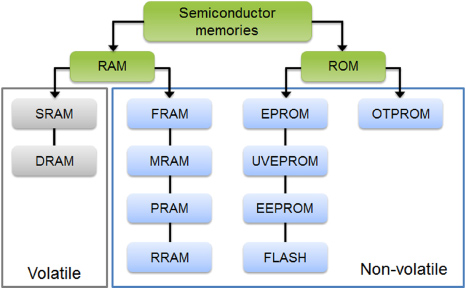
As the diagram below,


↓Semi-Conductor Memory↓


RAM( Random Access Memory)
-A form of computer data storage
-Read and Write only  in a predetermined order
-Volatile memory
-2 types: Static(SRAM) & Dynamic(DRAM)


DRAM(Dynamic RAM)


-Store each bit of data in a separate capacitor within an integrated circuit.
-Structural simplicity.
-Loses its data quickly when power is removed
-Cheaper
-Slower
-Need refresh circuits
-Main memory

DRAM Operation


# During the bit is read or written,the address line will be active.
-transistor switch closed

# Write
- High for 1, low for 0
- Signal apply to address line(change to capacitor)

# Read
-Select the address line, then transistor will turn on
-Charge from capacitor fed by bit line to sense amplifier
-Capacitor charge must be restored.


SRAM (Static RAM)


♂ Uses bis-table latching circuitry to store each bit.
♂ Periodically refreshed.
♂ More expensive.
♂ Less dense.
♂ Used in cache.
♂ Faster.
♂ Digital.
♂ Larger per bits.
♂ Complex construction.


SRAM Operation

~Standby
~Reading
~Writing


ROM(Read Only Memory)
It's permanent storage(non-volatile) and random access but can not be written to it.

Data stored in ROM cannot be modified (overwrite).


Types of ROM:


①PROM(Programmable ROM)
- Only program ONCE by user.
-Non-volatile.
-Programmed by burning the fuse using high current pulse.
-Flexible and convenient compared to ROM.


②EPROM(Erasable Programmable ROM)
 Re-programmable
∞ Erased by UV light
∞ More expensive than PROM
∞ Must be erased before to write it


③EEPROM
(Electrically Erasable PROM)
-No requirement of physically removed from the circuit for re-programming.
-Use special voltage level to erase data.
-Take much longer to write and read.
-More expensive than EPROM.
-Less dense.


④Flash Memory
- Special type of EEPROM
- Erase whole memory electrically, per block or per chip erasable.
- Suitable for used as solid state disk such as MemoryStick, SD(Scan Disk), MD(Micro Disk).


Ok. that's all for today. Hope your guys will learn something from my tutorial post. =)
I will continues to post the Cache at next tutorial post. See ya ! =D


                                                                 Written by--®æŋ